How can I give my site a title?
Introduction
Each QCS site has a title so that when assigning modules to other sites or selecting a site to download from you will know which site to select. Here are a few recommendations for your site's title:
- By default the name given to a site is the same as the name of the computer itself. This is not the best option as many times the name of the computer is not readable. You should give your site a name so that other sites will know from the name either where the site is located or who is responsible for the site.
- Keep the name of each site unique from all other sites.
- If you are using a desktop computer that stays in one location the name of that site should be associated with the location where it is at. For example, lets say you have a desktop computer running QCS at a office in Long Beach, California. A good name would be "Long Beach Office". That way if a site wanted to download an export file from this site it will be easily identifiable.
- If you are using a laptop computer that is mobile the name of that site should your own name. For example if your name is John Doe then you should name your site "John Doe's Laptop".
Changing the Name of Your Site
You can change the name of your site at any time. To change the name of your site perform the following steps:
- Open QCS and log in. If you are already logged in and in a contract you will need to get out of the contract by clicking on the [Close Contract] button in the upper left corner.
- Click on the [Contractor Library] button next to the [Select Contract] button.
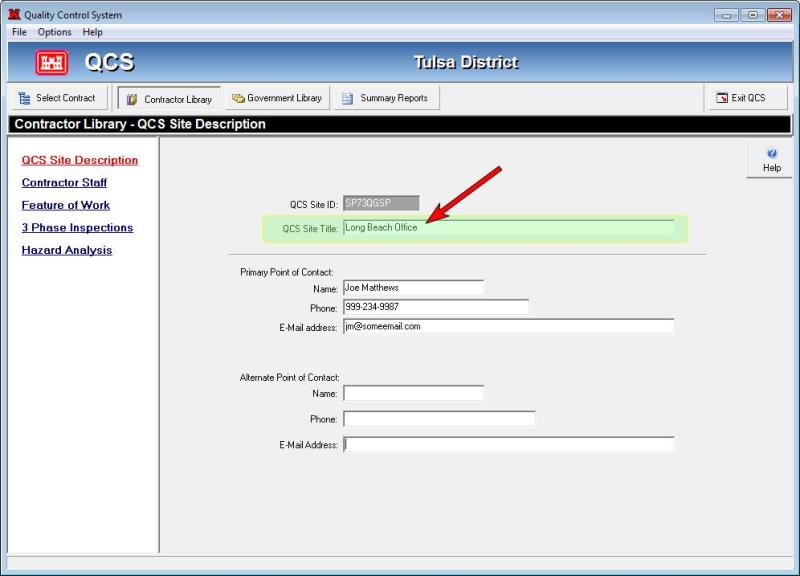
- Click on the "QCS Site Description" link on the left side.
- On the right side towards the top you will see the QCS Site Title text box to enter the title of your site as shown in the screen shot below: